


Imagine waking up to find your logistics partner refusing to pick up orders because of a sudden policy update.
That is exactly what happened to one of our e-commerce clients recently. They were using WooCommerce and the Delhivery One integration to handle their shipping across India. For months, everything worked perfectly. Then, a new government mandate regarding HSN Codes was strictly enforced by the logistics provider, and their operations came to a screeching halt.
Orders weren’t being dispatched. Invoices were being flagged as non-compliant. And the standard “Delhivery One” plugin offered no immediate way to map these mandatory HSN codes to the printed PDF invoices.
Here is how BabaPinnak stepped in to solve a 20-day bottleneck in just a few hours.
The Problem: A Compliance Bottleneck
Our client was facing a critical issue:
-
The Limitation: The Delhivery One system requires the HSN code to be present on the printed invoice to process the shipment manifest.
-
The Gap: Their WooCommerce setup didn’t have a default field for HSN codes, and the logistics plugin had no provision to map a custom field to the invoice document effectively.
-
The Delay: After reaching out to Delhivery support, the client was told there was no immediate provision to add or update these codes. The estimated wait time for a fix was indefinitely long—too long for a live business losing daily orders.
The Solution: Taking Control of the Invoice
Instead of waiting for a third-party update, we decided to build a workaround inside WooCommerce itself. Our goal was to create a “set and forget” system where the client could upload HSN codes in bulk, and the invoices would generate automatically with perfect compliance.
Step 1: The Data Structure
First, we needed a place to store the HSN code. We didn’t want to overcomplicate things with heavy plugins, so we used a standard WooCommerce Global Attribute named HSN Code (slug: pa_hsn_code).
Why this works:
✅ The client can now use the default WooCommerce CSV importer.
✅ Updates for thousands of products take minutes.
✅ No developer is needed for day-to-day stock additions.
Step 2: The Custom Template Logic
We used a PDF Invoicing Plugin to generate the documents. However, simply adding the HSN code wasn’t enough. We had to modify the template to handle three complex logic problems:
-
Parent vs. Variation: If a customer bought a “Small” shirt (Variation), the HSN code might be saved on the “T-Shirt” (Parent) level. Our code had to intelligently look “up” to find the correct HSN if it was missing from the specific variant.
-
Tax Calculation: The client required the invoice to show a flat 18% GST breakdown.
-
The “Duplicate” Glitch: By default, WooCommerce prints all meta-data. This meant our new HSN code was showing up twice—once where we wanted it, and again in the messy “meta” list.
The Technical Fix
The biggest challenge? WooCommerce was displaying HSN codes twice on every invoice—once in our custom column and again in the metadata section.
Here’s the intelligent cleaner we built:
PHP
// INTELLIGENT METADATA CLEANER
// This logic ensures HSN codes don't appear twice
if ( ! empty( $hsn ) ) {
    $pattern = '/(<[^>]*>)?\s*(HSN|HSN Code|pa_hsn_code)(<[^>]*>)?\s*:\s*(<[^>]*>)?\s*'
                . preg_quote($hsn, '/') . '/i';
    $meta_clean = preg_replace($pattern, '', $meta_clean);
}
What this does: It uses regex pattern matching to find and remove duplicate HSN code entries before the PDF generates, ensuring a clean, professional look.
The Result: Logistics Unblocked
Once we deployed this fix, the transformation was immediate:
-
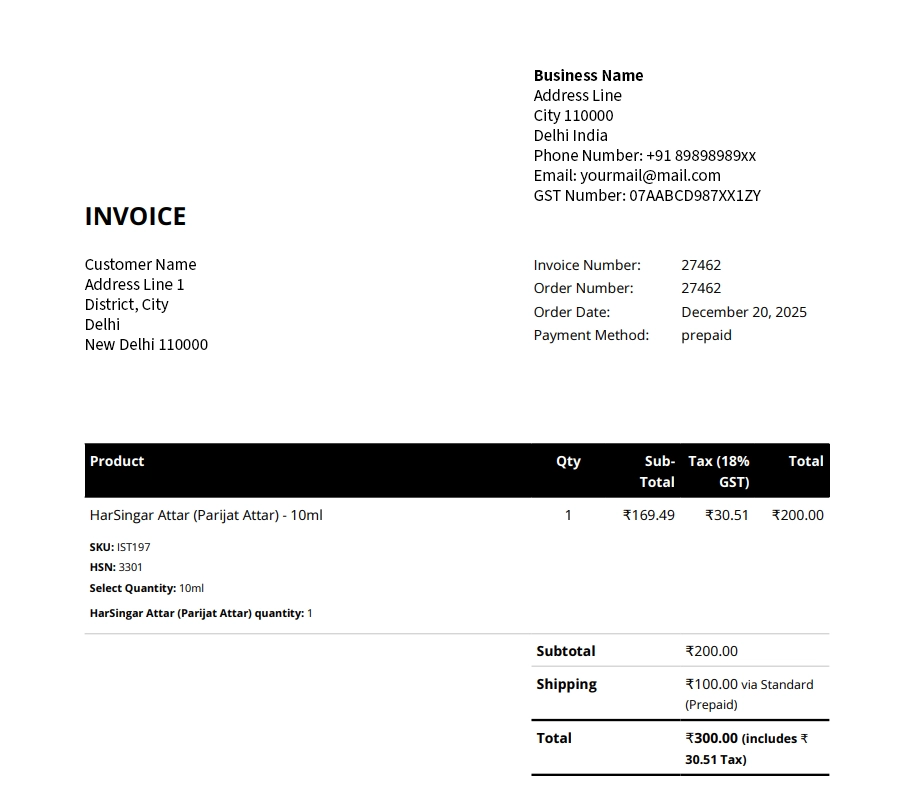
Compliance: Every PDF invoice now automatically generates with a dedicated 5-column layout, showing the Product, HSN, Sub-total, 18% Tax, and Total.
-
Speed: The client didn’t have to manually type a single code.
-
Operations: Delhivery accepted the new documents immediately, and the backlog of orders was dispatched the next day.
Common Questions (FAQs)
1. Will this work with logistics partners other than Delhivery?
Yes! Any partner requiring HSN codes on invoices (like Shiprocket, Pickrr, or BlueDart) will accept these compliant invoices.
2. Can I add HSN codes to existing products?
Absolutely. You can use WooCommerce’s native CSV importer to bulk-update thousands of existing products in minutes.
3. Do I need technical knowledge to implement this?
Basic WooCommerce familiarity helps for the data entry part. However, modifying the template requires PHP knowledge. If you are not comfortable editing code or worry about breaking your live site, contact BabaPinnak. We can safely deploy this fix for you without any downtime.
Need Help Solving Your WooCommerce Challenges?
Facing compliance issues, stuck shipments, or plugin limitations? BabaPinnak specializes in custom WooCommerce solutions that work—fast.
What We Fix:
-
✅ GST & HSN compliance automation
-
✅ Logistics integration issues
-
✅ Custom invoice templates
-
✅ Bulk product updates
-
✅ Plugin conflicts & limitations
Our Promise: If it’s blocking your business, we’ll engineer a solution. No waiting. Just results.
Contact BabaPinnak Today → Let’s get your orders moving again.
Related Keywords: WooCommerce HSN code solution, Delhivery compliance, GST invoice requirements, WooCommerce PDF Invoice Customization, Logistics automation.